AutoClipper by Khaled Media AI Video Clipper — Turn YouTube into viral Shorts, Reels & TikToks automatically.
The best free OpusClip alternative. Paste a YouTube URL → get AI-generated clips with captions, smart reframe, viral scoring, and one-click publish to TikTok, Shorts & Reels. 50+ features. No team needed.
✓ Free preview — no credit card✓ No watermarks on paid plans✓ You control everything
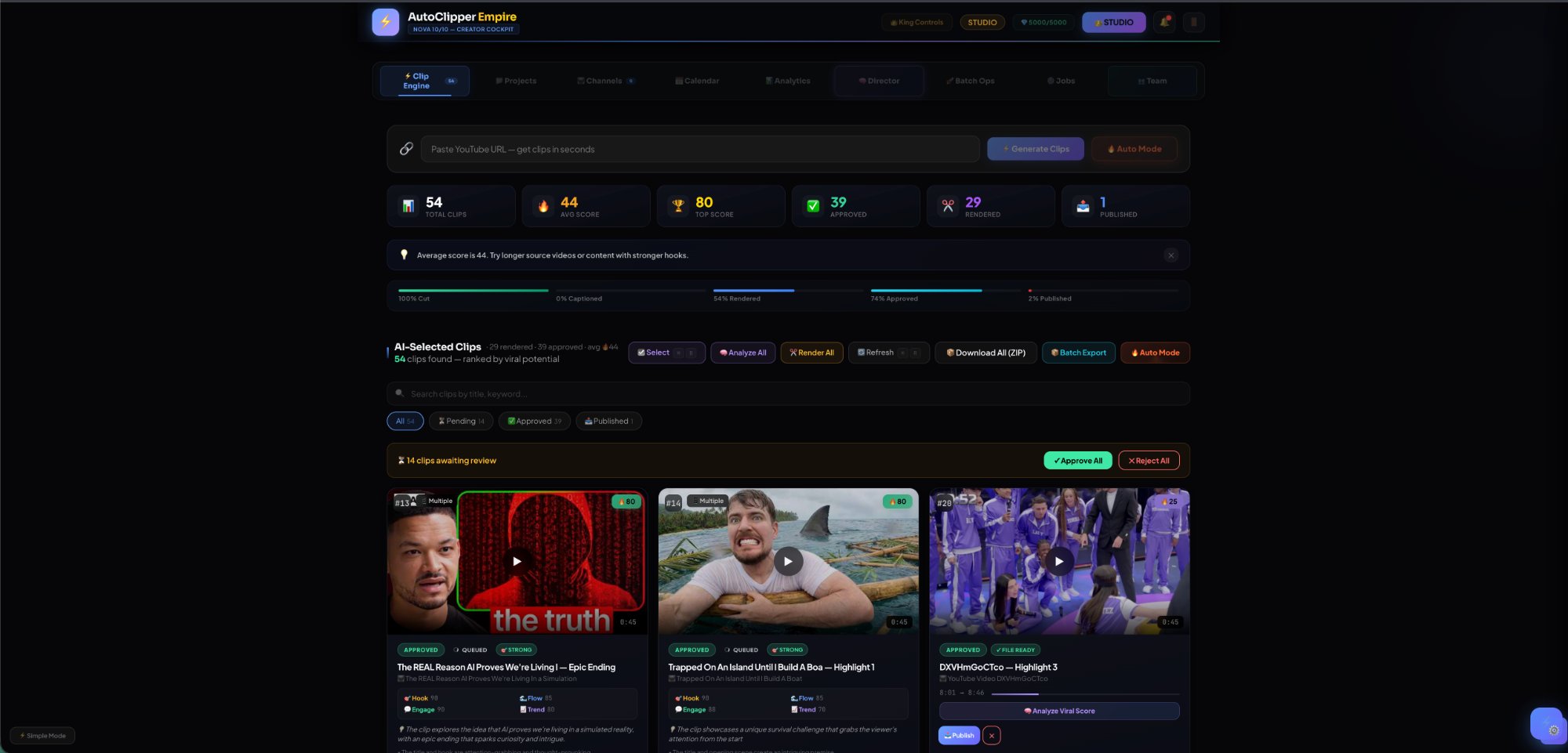
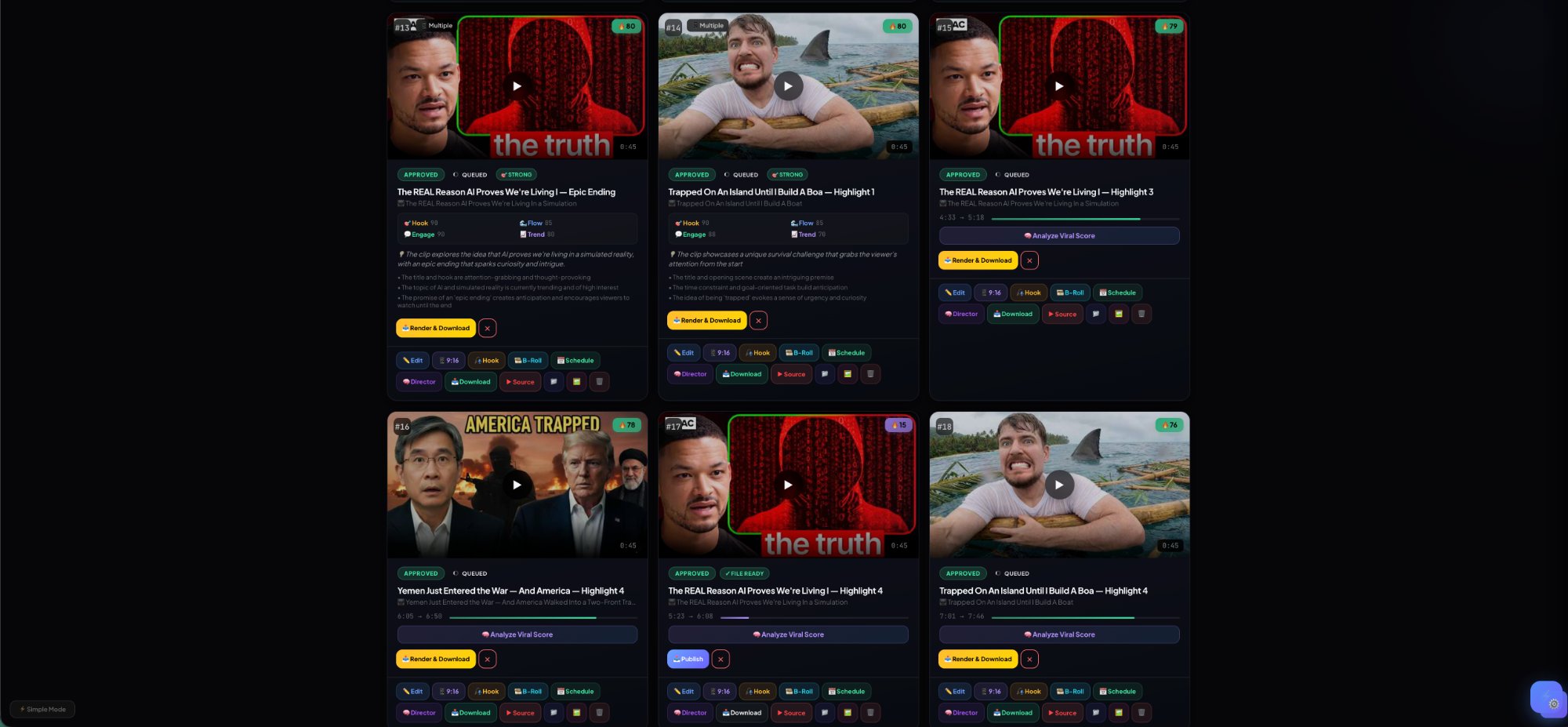
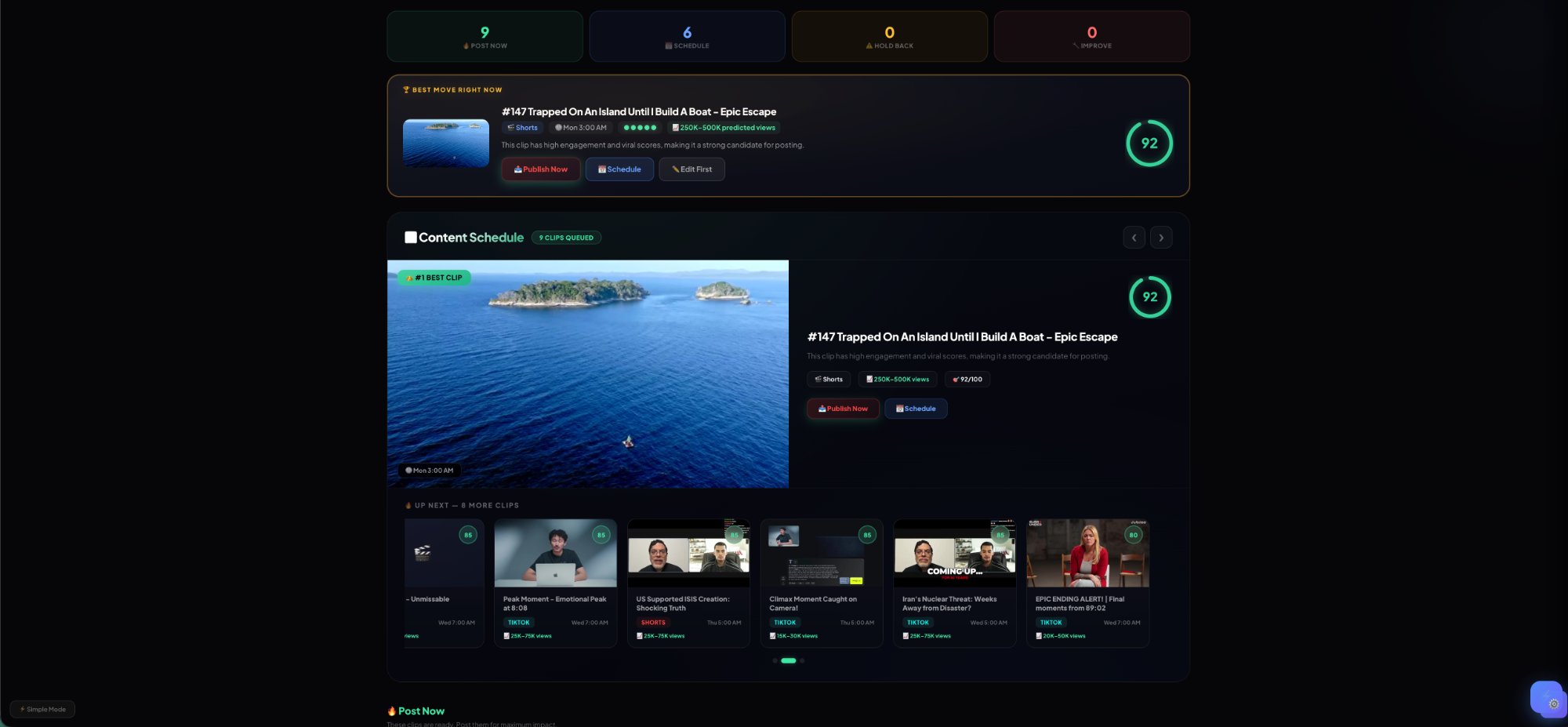
3 YouTube videos → 54 clips generated in under 5 minutes. Top clip scored 92/100 with AI-detected "Epic Escape" hook. Published to Shorts and TikTok in one click.
⚡
Live Product Test
AutoClipper Empire · Studio tier
What OpusClip charges for
Watermark removal: $29/mo on OpusClip. Free on AutoClipper. Clip storage past 3 days: $29/mo on OpusClip. Free on AutoClipper. Filler word removal: $29/mo on OpusClip. Free on AutoClipper.
$0
Price Comparison
Features that cost $348/yr elsewhere
Built different
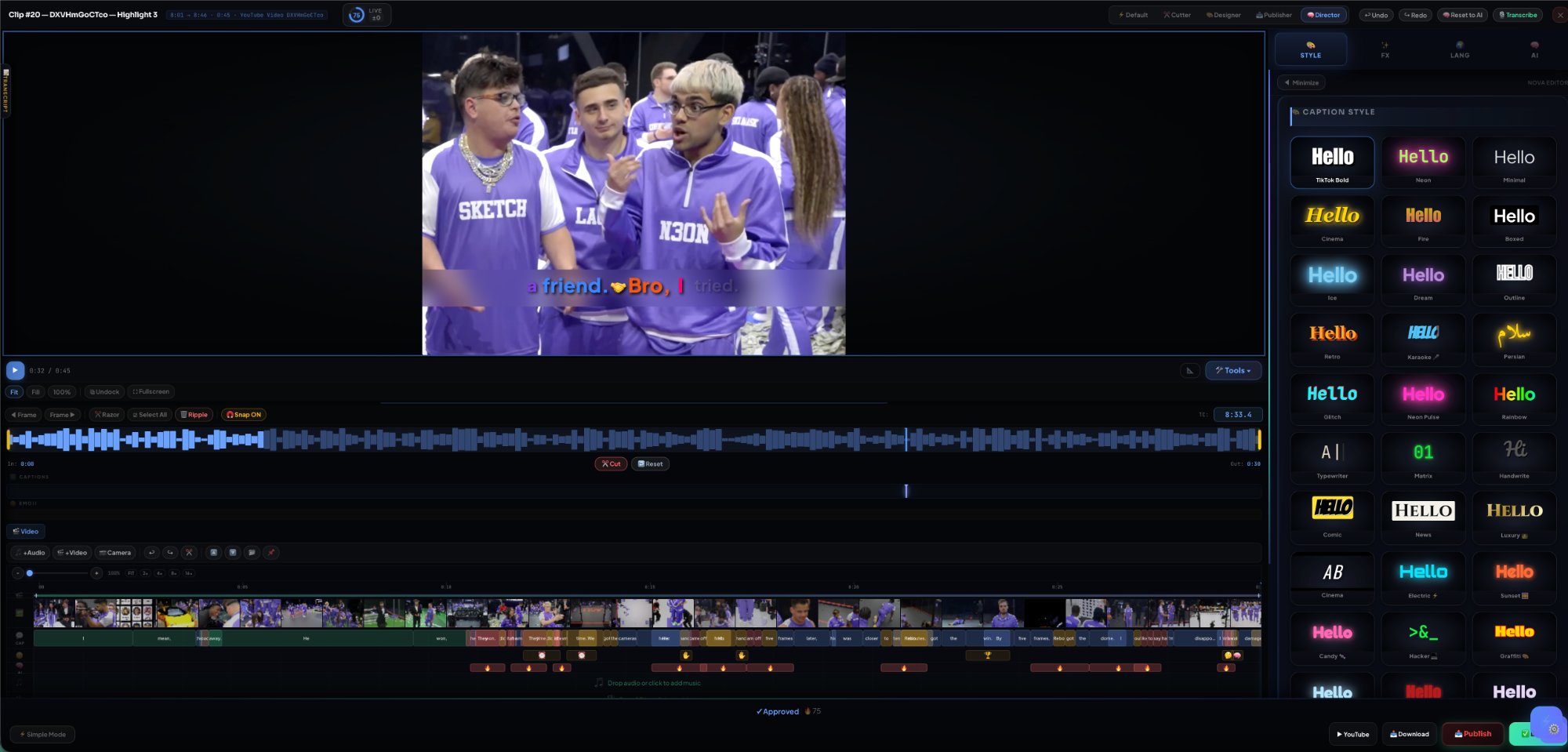
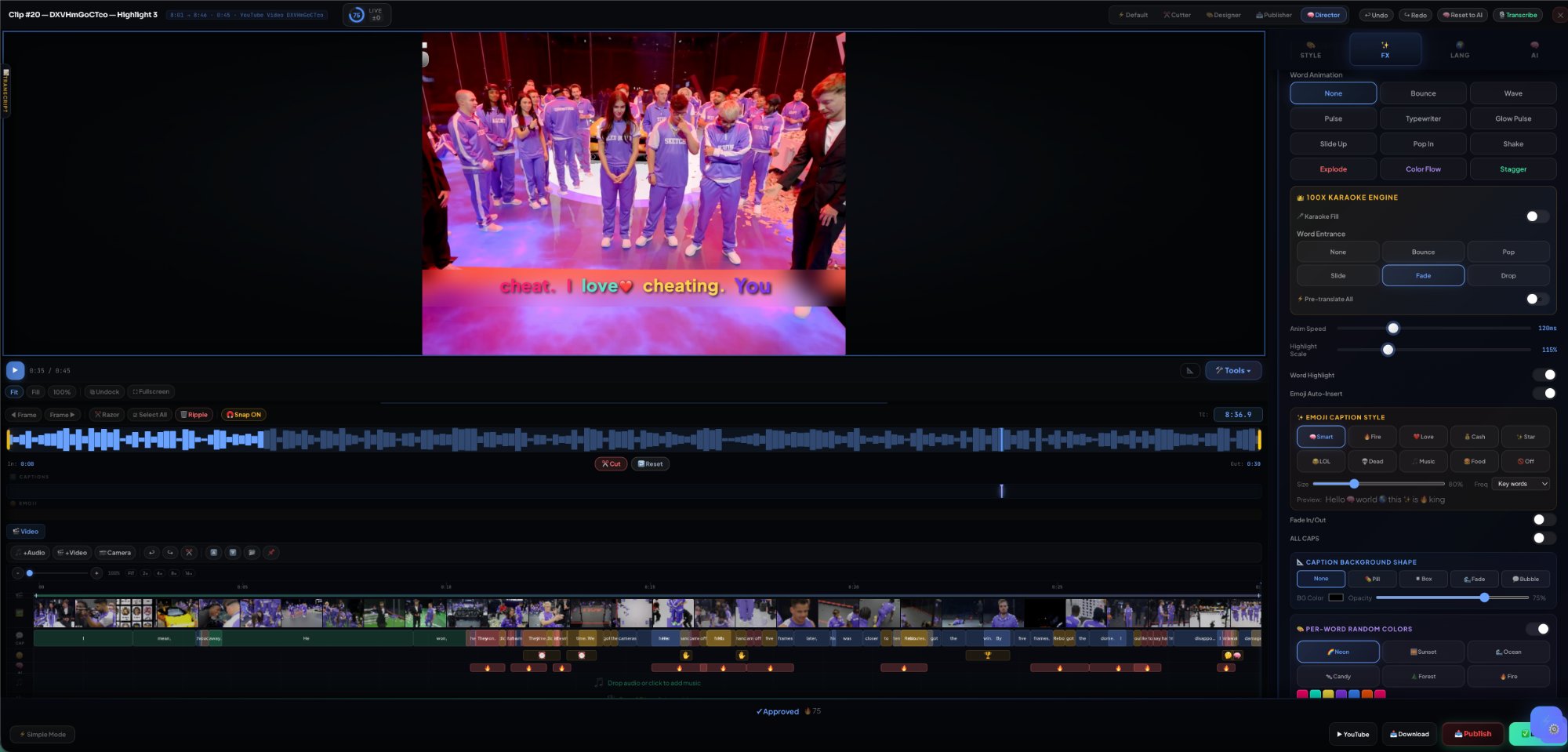
Full NLE editor with JKL playback, razor tool, multi-track layers. 22 caption styles with per-word color engine. AI Director with platform + timing intelligence. Not a wrapper around FFmpeg. A real product.
⚙️
Engineering
Solo-built from scratch · California
Works with your content
▶YouTube♪TikTok◎ReelsinLinkedIn𝕏X / Twitter
Not a clipper. A Creator Operating System.
Other tools clip videos. AutoClipper runs your entire content business.
Create → Publish → Monetize → Track. One system that handles every step from raw video to revenue. No team needed. No tool switching.
🚫 Other tools
Watermarks on free plan
✓ AutoClipper
Zero watermarks on paid plans
🚫 Other tools
Clips expire in 3 days
✓ AutoClipper
Your clips live forever
🚫 Other tools
Basic trim = "editing"
✓ AutoClipper
Full NLE — razor, layers, keyframes
🚫 Other tools
Score number with no explanation
✓ AutoClipper
AI explains WHY each clip works
🚫 Other tools
Confusing credit system
✓ AutoClipper
Transparent pricing — what you see is what you pay
What's Next
Features no other tool is building. We are.
We talked to hundreds of creators and agencies. These are the features they've been begging for. Multi-Account is live now. The rest ships this quarter.
🏢
Multi-Account Command Center
Connect up to 100 YouTube, TikTok, Instagram, and LinkedIn accounts. Route clips to the right channel automatically. Perfect for agencies managing dozens of clients.
Free: 1Pro: 25Studio: 100
✅ LIVE
🧪
A/B Clip Testing
Post two versions of the same clip — different hooks, captions, or thumbnails. AI tracks performance across platforms and tells you which one wins. Stop guessing. Start knowing.
✅ LIVE
🕵️
Competitor Clip Analysis
Paste any competitor's viral video. AI breaks down WHY it went viral — hook structure, pacing, emotional peaks — then generates similar clips from YOUR content.
✅ LIVE
📊
Post-Publish Tracking
After publishing, AI tracks views, engagement, and milestones across platforms — then feeds results back to improve future clip selection. Your AI gets smarter with every post.
✅ LIVE
🚀
Auto-Boost Winners
AI detects when a clip is going viral on one platform and automatically reposts it to all others. Your winners spread everywhere — without you lifting a finger.
✅ LIVE
🎣
Viral Hook Library
120+ proven viral hooks across 8 categories. AI matches hooks to YOUR clips, rewrites them for your content, and tracks which ones drive the highest retention.
Why Serious Creators Switch
Not more features. Better outcomes.
AutoClipper doesn't just clip videos. It finds the best moments, explains why they work, decides where to post them, and handles publishing — so you stop guessing and start growing.
01
Find the moments worth posting.
Paste a YouTube URL. AI watches the entire video, identifies the highest-potential moments, and pulls them as ready-to-use clips — scored, ranked, and explained. You stop scrubbing. You start choosing.
AI clipping engineVirality scoring 0–100Whisper transcriptionAuto Mode
02
Every score explained. Every clip understood.
Other tools give you a number. AutoClipper tells you why — hook strength, energy curve, clarity, timing, filler words. You don't just pick the best clip. You understand what makes content work.
Score breakdown"Why this works" analysisFiller detectionHook analysis
03
Stop guessing what to post.
AI Director recommends the best clip, the best platform, and the best posting window. TikTok at 7:30 PM? Reels on Tuesday? It tells you — with a confidence score so you move faster.
AI DirectorPlatform recommendationPosting time optimizerConfidence scoring
04
Captions people actually want to watch.
22+ caption styles with word-by-word animation. Viral Pop, Neon Glow, Cinzel Gold, Bounce, Karaoke Fill — every style animates in real time on real video. Plus bilingual dual-caption support no other tool offers.
Multi-layer timeline with JKL playback, razor cut, frame-by-frame stepping, AI heatmap, filler detection, snap-to-beat. Text-based editing — delete words to delete video. Not a trim tool. A real editor.
Pro timelineText-based editingNovaTF overlaysLayer orchestra5 workspace modesCmd+K command bar
07
Runs beyond the clip. This is a content OS.
Channel management, multi-platform publishing queue, scheduling, analytics direction, and Autopilot Mode — paste a URL and everything happens automatically. This is where clip tools end and a content operating system begins.
Other tools give you ~10 basic text styles. We built 22+ with per-word color, karaoke fill, emoji injection, and animated highlights — all auto-applied.
No credit card required · Preview your clips free · Upgrade to unlock
What creators say
Loved by creators who stopped switching tools.
"I was paying $29/mo for OpusClip and getting 10 clips. Switched to AutoClipper and got 50+ clips for free. The editor is actually better too — real timeline, layers, the works."
U
@quickusman11
Creator Plan · 20 clips
★★★★★
"The viral scoring is scary accurate. AI told me which clip would perform best, I posted it, and it did 3x my normal views. The whole workflow — clip, caption, publish — takes under 2 minutes."
S
@sjvillamor585
Power User · 23 clips
★★★★★
"Finally a tool that supports Dari and RTL languages properly. I create content for Afghan audiences and every other tool fails at Farsi captions. AutoClipper handles it perfectly."
A
Afghan Creator
Dari Content · Starter Plan
★★★★★
Built for how you create.
Whether you're a solo creator, podcaster, or agency — AutoClipper adapts to your workflow.
🎬
YouTube Creators
Turn long videos into Shorts. Grow your channel 5x faster with AI-scored clips.
🎙️
Podcasters
Extract the best sound bites. Add captions. Post to all platforms in one click.
🏢
Agencies
Manage multiple channels. Brand templates. Client portals. Team approvals.
📚
Educators
Clip lectures into bite-sized lessons. Multilingual captions. Share anywhere.
How It Works
Three steps. That's it.
1
🔗
Paste Video
Drop a YouTube URL or upload a file. That's your only input.
2
🚀
Run My Studio
One click. AI clips, captions, scores, picks platforms, and schedules — automatically.
Top affiliates earn $500+/month · Custom white-label available
The first Creator Operating System
Stop juggling 5 different tools.
Create. Publish. Monetize. Track. One system that does it all — and makes money for you. Preview free.
50+ AI features
22+ caption styles
40+ languages
$0 to start
No credit card · No watermarks on paid plans · Clips never expire · Cancel anytime
🔥
Switching from OpusClip?
Get 500 bonus credits free when you subscribe. Just show us a screenshot of your active OpusClip account after signup.
✓ Half the price✓ 10x more credits✓ Clips never expire✓ Full editor on all plans
Email [email protected] with your OpusClip screenshot after subscribing
Frequently Asked Questions
Ready to turn videos into viral clips?No credit card required
About AutoClipper by Khaled Media
AutoClipper by Khaled Media is a web-based video clipping and publishing application that helps users turn long-form videos into short clips, add captions, edit content, and prepare videos for publishing. The application is designed for content creators, media teams, and digital publishers who want to streamline short-form content workflows.
Why Google Sign-In is used
AutoClipper uses Google Sign-In to securely authenticate users and allow access to supported Google account features where applicable. We only request permissions necessary for the functionality of the application and do not access or use user data beyond what is required.
✅ They sign up → +50 credits for you, +20 credits for them
⚡ They upgrade → +200 bonus credits
👑 10 referrals = Free Pro account forever!
⏳ Referral credits expire after 45 days — use them!
🔒
Upgrade to Unlock
This feature requires a higher plan.
🔥
Nova Auto Mode
Paste a URL and let Nova build your content strategy
Starting...
Video Source
Target Platform
🌐 All
📱 TikTok
🎬 Shorts
📸 Reels
Content Mode
🔥 Viral
🎙 Podcast
🎵 Music
🎤 Interview
⚙ Advanced Settings
Max Clips
Top 3
Top 5
Top 10
All
📋 Input Summary
🔥
Ready to build your content engine
Paste a YouTube URL, pick your platform and content mode, then hit Launch. Nova handles everything.
🧠
Nova Brain
Status
Waiting for input
Video Type
—
Clips Found
0
Strongest Hook
—
Best Platform
—
Top Score
—
Nova Says
Paste a URL to begin analysis
🚀 Autopilot Pipeline
One click. Full pipeline. Generate → Caption → Reframe → Export → Publish.
1
⚡ Generate Clips
AI finds viral moments, scores and ranks them
2
💬 Auto-Caption
Transcribe with Whisper + apply your style preset
3
📐 Smart Reframe
Face-track → crop to 9:16 vertical for Shorts/Reels/TikTok
4
🔥 Burn-In Export
FFmpeg burns captions into video → production-ready MP4
5
📤 Publish to YouTube
Upload as YouTube Short with title, tags, thumbnail
TargetAll clips
Caption StyleCurrent style
Reframe9:16 (Shorts)
Estimated Time~2-5 min per clip
Action completed
👑 Add Channel
Connect any platform — start clipping in seconds
🔗 Paste Channel URL or Handle
Display Name (optional — auto-detected from URL)
📡 Platform
▶YouTube
🎵TikTok
📸Instagram
𝕏Twitter/X
📘Facebook
Aspect Ratio
9:16
16:9
1:1
4:5
Max Clip Length
👑 King Auto-Settings
🚀 Run My Studio
Choose what your system does — then sit back.
✓
✂️
Create ClipsGenerate AI clips from your latest video
✓
🎙️
Caption AllAuto-transcribe and style captions
✓
✅
Approve Top ClipsAuto-approve clips scoring 65+
✓
📅
Schedule PostsSchedule across the next 7 days at best times
✓
🔄
Repurpose WinnersCreate 6 platform variants of top clips
✓
📤
Publish NowImmediately publish approved clips
✓
🎙️
Add VoiceoverAuto-voice with best match or your clone
✓
💰
Attach MonetizationAuto-attach your default link to approved clips
⚡ Instant Mode — Review Before Launch
Your AI selected the best. Review, adjust, then launch.
🔥 AUTO-SELECTED CLIPS
📅 PROPOSED SCHEDULE
🚀
Campaign Launched!
Your content machine is running
📈 Estimated Reach
—
Based on your avg scores and platform data
🎨 Brand Kit Manage your brand templates
Your Templates
Loading...
Select a template or create new
Upload Video
Paste URL
Auto Mode
Monetize This
Command Bar
Upgrade Plan
🛡️
Content Ownership
Using video you don't own may violate copyright laws. Please confirm your rights to this content.
🔗Video source
👑 I own this content
This is my original video — I created it
✅ I have permission
The content owner authorized me to use this video
📋 Fair use / commentary
I'm using this under fair use for commentary, education, or criticism
By continuing, you agree to our Terms of Service and accept responsibility for content you process. Content owners can submit takedown requests via our DMCA process.
🎯
AI Pre-Flight Config
P2.A
AI is analyzing your video in the background — pick your preferences while it works.
— Format9:16 vertical
A
AutoClipper
AI Brain Session · v4 · 3D · BUILD 68
01of 10 — Briefing
AI ready · analyzing in background
🔊 Try cinematic audio
100%
✦
Pro feature · locked on Free
Pro feature
Unlock this and 42 more by upgrading to Pro.
Limited · First-month 50% off ends in 23h 47m 12s
12K+
Creators on Pro
$4.2M
Paid to creators
47×
More views vs free
Free
$0
Current plan
1 clip per video
720p with watermark
YouTube publish only
3 caption styles
Basic Smart Frame
Most popular
Pro
$19/mo
Cancel anytime
20 clips per video · auto-ranked
4K · no watermark
Publish to all 8 platforms
All 35 caption styles
10 Smart Frame modes + AI face-track
Priority queue · fast renders
★★★★★"Made $1,200 in week one."— Jordan T., 47K followers
⚡
Preparing your video
Setting up the AI pipeline...
0%
AutoClipper analyzes 50+ data points per video to find the best moments
👑
PRO
Unlock Premium Style
This caption style is available on the Pro plan and above.