ESC

⌨️ Keyboard Shortcuts

Global
Command Bar
K
Shortcuts Help
?
Close Modal
Esc
Editor
Play / Pause
Space
Undo
Z
Redo
Z
Cut at Playhead
C
Export
E
Toggle Safe Zones
S
Toggle Captions
T
Toggle Transcript
T
Playback
Speed Up
]
Speed Down
[
Skip Forward 5s
Skip Back 5s
Frame Forward
.
Frame Back
,
Navigation
Zoom In Timeline
+
Zoom Out Timeline
-
Snap to Word
W
Workspace (S13)
Fullscreen Preview
F
Modes Alt+1-5
Alt1-5
Toggle Inspector
AltI
Toggle Timeline
AltT
Timeline Pro (S14)
Frame Step
.,
JKL Playback
JKL
Razor / Snap
RN
Ripple Delete
Del
Add Marker
M
THE FIRST CREATOR OPERATING SYSTEM

AI Video Clipper — Turn YouTube into viral Shorts, Reels & TikToks automatically.

The best free OpusClip alternative. Paste a YouTube URL → get AI-generated clips with captions, smart reframe, viral scoring, and one-click publish to TikTok, Shorts & Reels. 50+ features. No team needed.

✓ Free forever — no credit card ✓ No watermarks on paid plans ✓ You control everything
🔗
50+Features 22+Caption Styles 5Platforms 0Watermarks $0To Start
35K+
Lines of Code
50+
Features Built
22+
Caption Styles
$0
To Start — Forever
Real result
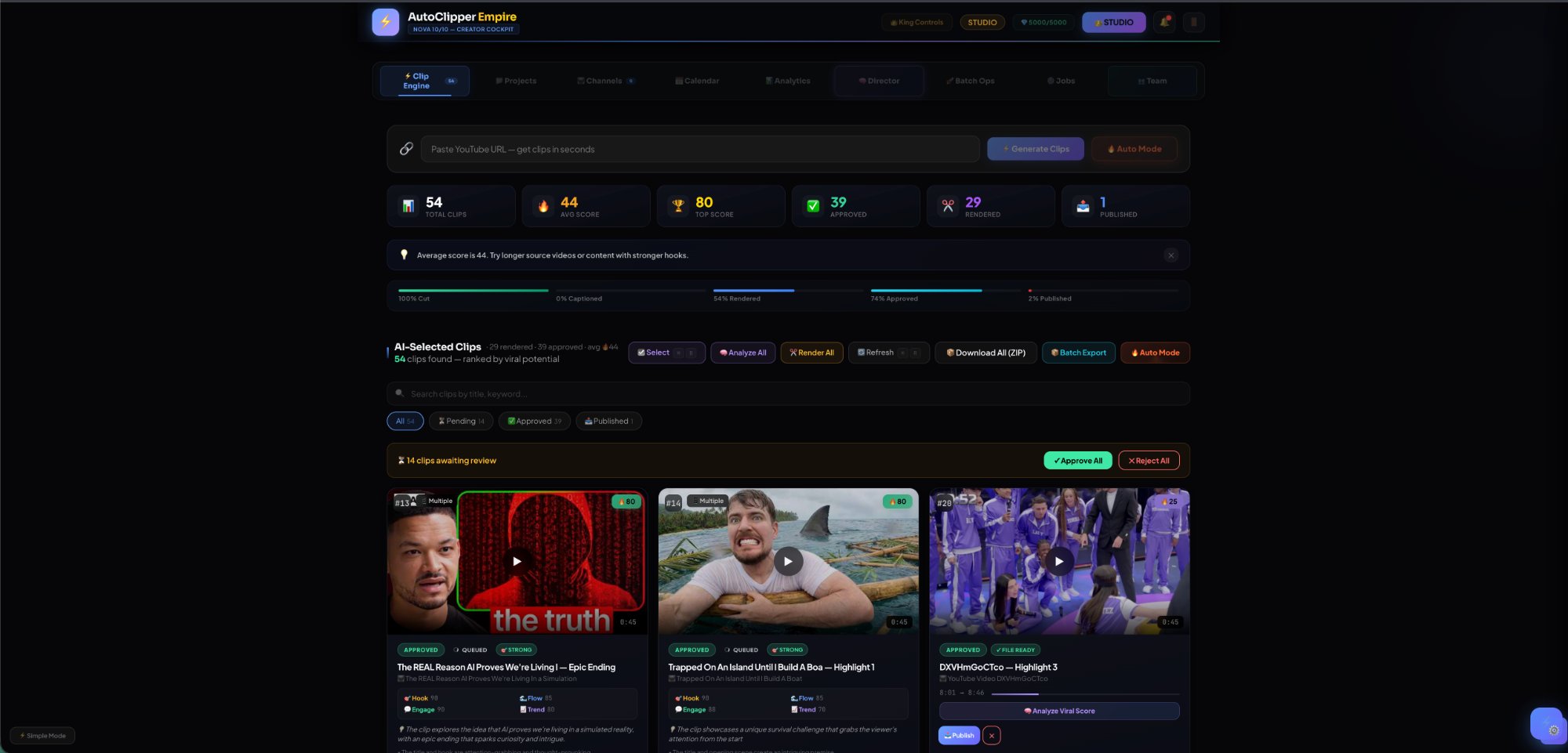
3 YouTube videos → 54 clips generated in under 5 minutes. Top clip scored 92/100 with AI-detected "Epic Escape" hook. Published to Shorts and TikTok in one click.
Live Product Test
AutoClipper Empire · Studio tier
What OpusClip charges for
Watermark removal: $29/mo on OpusClip. Free on AutoClipper. Clip storage past 3 days: $29/mo on OpusClip. Free on AutoClipper. Filler word removal: $29/mo on OpusClip. Free on AutoClipper.
$0
Price Comparison
Features that cost $348/yr elsewhere
Built different
35,000+ lines of code. Full NLE editor with JKL playback, razor tool, multi-track layers. 22 caption styles with per-word color engine. AI Director with platform + timing intelligence. Not a wrapper around FFmpeg. A real product.
⚙️
Engineering
Solo-built from scratch · California
Works with your content
YouTube TikTok Reels inLinkedIn 𝕏X / Twitter
Not a clipper. A Creator Operating System.
Other tools clip videos.
AutoClipper runs your entire content business.

Create → Publish → Monetize → Track. One system that handles every step from raw video to revenue. No team needed. No tool switching.

🚫 Other tools
Watermarks on free plan
✓ AutoClipper
Zero watermarks on paid plans
🚫 Other tools
Clips expire in 3 days
✓ AutoClipper
Your clips live forever
🚫 Other tools
Basic trim = "editing"
✓ AutoClipper
Full NLE — razor, layers, keyframes
🚫 Other tools
Score number with no explanation
✓ AutoClipper
AI explains WHY each clip works
🚫 Other tools
Confusing credit system
✓ AutoClipper
Transparent pricing — what you see is what you pay
22+ Caption Styles
Captions that stop the scroll.

Other tools give you ~10 basic text styles. We built 22+ with per-word color, karaoke fill, emoji injection, and animated highlights — all auto-applied.

This is fire
Highlight Pop
Every word hits different
Per-Word Color
Neon Glow ✨
Neon Glow
GRADIENT FIRE
Gradient Fill
Box Style
Background Box
This changes everythingEsto lo cambia todo
English / Spanish
🔥 Going viral 🚀
Emoji Inject
+ 15 more: Karaoke Wipe · Bounce · Typewriter · Wave · Glitch · Cinema · Outline · 40+ languages
What's Next
Features no other tool is building. We are.

We talked to hundreds of creators and agencies. These are the features they've been begging for. Multi-Account is live now. The rest ships this quarter.

🏢
Multi-Account Command Center
Connect up to 100 YouTube, TikTok, Instagram, and LinkedIn accounts. Route clips to the right channel automatically. Perfect for agencies managing dozens of clients.
Free: 1Pro: 25Studio: 100
✅ LIVE
🧪
A/B Clip Testing
Post two versions of the same clip — different hooks, captions, or thumbnails. AI tracks performance across platforms and tells you which one wins. Stop guessing. Start knowing.
✅ LIVE
🕵️
Competitor Clip Analysis
Paste any competitor's viral video. AI breaks down WHY it went viral — hook structure, pacing, emotional peaks — then generates similar clips from YOUR content.
✅ LIVE
📊
Post-Publish Tracking
After publishing, AI tracks views, engagement, and milestones across platforms — then feeds results back to improve future clip selection. Your AI gets smarter with every post.
✅ LIVE
🚀
Auto-Boost Winners
AI detects when a clip is going viral on one platform and automatically reposts it to all others. Your winners spread everywhere — without you lifting a finger.
✅ LIVE
🎣
Viral Hook Library
120+ proven viral hooks across 8 categories. AI matches hooks to YOUR clips, rewrites them for your content, and tracks which ones drive the highest retention.
Why Serious Creators Switch
Not more features.
Better outcomes.

AutoClipper doesn't just clip videos. It finds the best moments, explains why they work, decides where to post them, and handles publishing — so you stop guessing and start growing.

01
Find the moments
worth posting.

Paste a YouTube URL. AI watches the entire video, identifies the highest-potential moments, and pulls them as ready-to-use clips — scored, ranked, and explained. You stop scrubbing. You start choosing.

AI clipping engine Virality scoring 0–100 Whisper transcription Auto Mode
02
Every score explained.
Every clip understood.

Other tools give you a number. AutoClipper tells you why — hook strength, energy curve, clarity, timing, filler words. You don't just pick the best clip. You understand what makes content work.

Score breakdown "Why this works" analysis Filler detection Hook analysis
03
Stop guessing
what to post.

AI Director recommends the best clip, the best platform, and the best posting window. TikTok at 7:30 PM? Reels on Tuesday? It tells you — with a confidence score so you move faster.

AI Director Platform recommendation Posting time optimizer Confidence scoring
04
Captions people
actually want to watch.

22+ caption styles with word-by-word animation. Viral Pop, Neon Glow, Cinzel Gold, Bounce, Karaoke Fill — every style animates in real time on real video. Plus bilingual dual-caption support no other tool offers.

22+ styles Word-by-word animation Bilingual captions (40+ languages) Per-word emphasis Burn-in export
05
One clip, adapted
for every platform.

Same source clip becomes 4 platform-native versions — not lazy crops. TikTok gets bold saturation. Reels gets warm tones. Shorts stays clean. LinkedIn goes professional square. Each version feels native.

TikTok · 9:16 Bold Reels · 9:16 Warm Shorts · 9:16 Clean LinkedIn · 1:1 Pro Face-tracking reframe
06
When you want full
control, it's there.

Multi-layer timeline with JKL playback, razor cut, frame-by-frame stepping, AI heatmap, filler detection, snap-to-beat. Text-based editing — delete words to delete video. Not a trim tool. A real editor.

Pro timeline Text-based editing NovaTF overlays Layer orchestra 5 workspace modes Cmd+K command bar
07
Runs beyond the clip.
This is a content OS.

Channel management, multi-platform publishing queue, scheduling, analytics direction, and Autopilot Mode — paste a URL and everything happens automatically. This is where clip tools end and a content operating system begins.

YouTube OAuth publishing Multi-channel management Scheduling queue Autopilot Mode KPI dashboard Batch operations
Full Platform Map
84 features. One system.

Everything built, deployed, and production-ready.

Core AI Engine
AI Clipping · Virality Scoring · AI Director · Whisper Transcription · Filler Detection · Smart Reframe · Auto Mode
7 features
Caption System
22+ Styles · Word-by-Word · Per-Word Color · Background Shapes · Bilingual Captions · Burn-In Export · Fine-Tuning Controls
7 features
Multi-Platform Export
TikTok · Reels · Shorts · LinkedIn · Batch Export · Platform-Specific Filters
6 features
Full Editor + Transcript
Pro Timeline · JKL Playback · Razor Cut · Frame Step · Snap to Beat · Multi-Select · Ripple Delete · Zoom 1600% · AI Heatmap · Text Editing · Transcript Panel · Word Delete · Dual Mode · NovaTF Transforms · Text Overlays · Emoji Picker · Layer Orchestra · Inline Editing
18 features
Workspace + Projects
5 Layout Modes · Smart Timeline · Preview Undock · Cmd+K Palette · Detachable Panels · Projects System · Batch Ops · Job Queue · Workflow Modes
9 features
Channels + Publishing
YouTube OAuth · Multi-Channel · Channel Art · YouTube Publish · Auto Scheduling · Multi-Platform Queue · Calendar View · One-Click Publish · Autopilot Mode
9 features
Analytics + Monetization
KPI Dashboard · Performance Badges · Clip Comparison · Clip Search · Notifications · 5-Tier Stripe Pricing · Credit System · Plan Management
8 features
Infrastructure + Admin
WARP Proxy · PM2 Services · FFmpeg Pipeline · Remotion Engine · MySQL 19+ Tables · nginx + SSL · RBAC · Session Auth · Health Monitoring · Hero Admin · Cinematic Landing · 5 Feature Films
12 features + 8 landing assets
84 features · 8 systems · 1 platform
🛡️
No auto-post without approval
Nothing goes live until you say so. Every clip requires your review first.
👑
You control everything
Override AI decisions anytime. Pin preferences. Reset memory. Your system, your rules.
Platform-safe monetization
FTC-compliant disclosures auto-applied. No risk, no spam, no policy violations.
🔒
Your data stays yours
No training on your content. No sharing. Your clips, your revenue, your business.
THE FULL SYSTEM
One system. Four engines.
Zero tool switching.

Other tools handle one step. AutoClipper runs the entire pipeline — from raw video to published content to revenue.

Create
AI clips, captions, hooks, reframe, voice — all automated
📤
Publish
Schedule, queue, approve, multi-platform — one click
💰
Monetize
Smart links, campaigns, bio pages, revenue tracking
📊
Track
Analytics, A/B tests, competitors, AI learning — all feeds back
17 FEATURES. ZERO MISSING.
Every weapon in your
content empire.

Not roadmap promises. Not "coming soon." Every feature below is built, tested, and live right now.

AI Clip EngineLive
Paste a URL → AI finds viral moments, scores 0–100, pulls clips automatically. Groq/Llama-powered.
🧠AI DirectorLive
Automated clip generation with smart decisions — hook selection, caption style, reframe, and export in one flow.
✏️King Timeline EditorLive
Pro NLE with JKL playback, razor tool, ripple delete, 1600% zoom, layer orchestra, smart markers.
💬AI CaptionsLive
Whisper large-v3 transcription, 22+ caption styles, word-by-word highlight, emoji injection, RTL Dari/Farsi support.
📐Smart ReframeLive
One-click 16:9 → 9:16 conversion with face detection, energy-aware framing, and manual override.
🚀Autopilot PipelineLive
One-click Generate→Caption→Reframe→BurnIn→Publish. Toggleable steps, max clip selector, live log.
📤Multi-Platform PublishLive
YouTube OAuth publish live now. TikTok & Instagram Reels coming soon. Per-account variants, translation, and scheduling.
💣Blast OrchestrationLive
One clip → blast to all accounts simultaneously. Auto-translate per group, SSE progress, retry on failure.
👑Multi-Account CommandIndustry First
Manage 100+ social accounts from one dashboard. Account groups, one-click group select, per-account settings.
🎣Viral Hook LibraryLive
AI-generated hooks sorted by niche and style. One-click apply to any clip. Track which hooks drive the most views.
🔥Smart Timeline AILive
Energy heatmap, filler/silence markers, one-click remove dead air. AI sees your timeline like a pro editor.
🎨NovaTF Overlay SystemLive
8 resize handles, rotate, numeric inspector, z-order, inline caption editing — Photoshop-level transforms.
💎Credits & MonetizationLive
Usage dashboard, per-action costs, Stripe top-up, boost packs, low-credit warnings. Full transparency.
🎁Referral EngineLive
Invite links, 50 credits per signup, 45-day expiry, social sharing, 10 referrals = free Pro account forever.
🌍AI TranslationLive
Translate captions to any language with style matching. Dari/Farsi/Arabic RTL fully supported. Bulk translate per group.
📊Post-Publish TrackingLive
Performance snapshots, milestones, insights per clip. Track views, engagement, and growth across all platforms.
🏗️Liquid WorkspaceLive
5 workspace modes (Alt+1–5): Focus, Editor, Timeline, Empire, Cinema. Instant layout switching, saved per user.
No credit card required · 30 free credits · All features available
How It Works
Three steps. That's it.
1
🔗
Paste Video
Drop a YouTube URL or upload a file. That's your only input.
2
🚀
Run My Studio
One click. AI clips, captions, scores, picks platforms, and schedules — automatically.
3
💰
Earn
Content goes live. Monetization links attached. Revenue tracked. You're done.
Why Switch
They clip. We run your empire.

OpusClip only clips. Blotato only posts. Hootsuite only manages. AutoClipper does all of it — and makes money for you.

The first Creator Operating System: Create → Publish → Monetize → Track → Optimize → Revenue.

Feature⚡ AutoClipperOpusClipBlotatoHootsuite
Core purposeFull Creator OSClipper onlyContent engineSocial manager
Watermarks on freeNone on paid plans✗ WatermarkedUnknownN/A
Clip expiryForever3-day expiryN/A
Caption styles22+ with mood colors~10Basic
Full NLE editor✓ Multi-track + layers✗ Trim only
AI Director✓ When + where + whyBasic
Repurpose engine (1→8)✓ 8 platforms
Hook library120+ hooks + AI harvest
A/B testing✓ Auto-winner
Competitor analysis✓ AI gap analysisBasic
Content graph + lineage✓ Full tree
Approval workflows✓ Multi-step
Client portal✓ Token-based review
Agency + white-label✓ Full brandingEnterprise
Faceless video studio✓ AI scenes
API + webhooks✓ Full APILimited
Keyboard shortcuts⌘K + 48 commands
Starting priceFREE foreverFree (limited)$29/mo$99/mo
Pricing
Plans for every creator

Start free. Upgrade when you're ready to scale.

Monthly
Yearly Save 30%
Free
$0 /mo
Try the platform
30 credits/month
  • 3 clips per video
  • 1080p export
  • Watermarked exports
  • 1 connected account
  • No AI Director
  • No batch export
Creator
$19$19 /mo
For growing channels
150 credits/month
  • 10 clips per video
  • 1080p export
  • No watermark
  • 5 connected accounts
  • Auto Mode
  • AI Director
Pro
$49$49 /mo
Full power unlocked
500 credits/month
  • Unlimited clips/video
  • 4K export
  • All 22+ caption styles
  • 25 connected accounts
  • Smart Reframe
  • King Timeline Editor
  • Batch export & publish
  • Scheduler
Studio
$99$99 /mo
For teams & agencies
2,000 credits/month
  • Unlimited everything
  • 4K export
  • 100 connected accounts
  • Team seats (5)
  • Priority rendering
  • API access
  • Analytics dashboard
Enterprise
Custom
Unlimited scale
Unlimited credits
  • Unlimited accounts
  • White-label option
  • Dedicated support
  • Custom integrations
  • SLA guarantee
  • Unlimited team seats
The first Creator Operating System

Stop juggling 5 different tools.

Create. Publish. Monetize. Track. One system that does it all — and makes money for you. Free forever.

550 API routes
113 database tables
32 phases built
65K lines of code
No credit card · No watermarks on paid plans · Clips never expire · Cancel anytime
AutoClipper — AI Video Clipper by Khaled Media LLC | Privacy Policy | Terms of Service | Free OpusClip Alternative
🎯 Guide Mode FOCUS ESC
AutoClipper Empire
Nova 10/10 — Creator Cockpit
🏢
My Workspace
owner
👑 STUDIO
Your Workspaces
+ New Workspace
FREE 💎 30/30
Ingest
Generate
Edit
Publish
Monetize
Drop a video to start
Notifications
🔔
No notifications
Alerts appear as you create, publish, and grow
System idle
0 scheduled
0 in pipeline
Engine
💡
IDEA
✂️
CLIP
🎬
EDIT
🔥
SCORE
🔄
REPURPOSE
📤
PUBLISH
📊
TRACK
Welcome back
Your empire at a glance
Systems OK
🌙
You're done for today
Great session. Your clips are working for you while you rest.
Content Pipeline
Recent Clips
Active Campaigns
🧠 Your AI Profile
LEARNING
📱
Preferred Platform
Best Post Time
🎯
Hook Style
🔥
Avg Approved Score
🛡️ AI Trust Controls
🧠
Learning from youAI watches your approvals, schedule times, and preferences
💡
Smart suggestionsAI recommends hooks, times, and platforms based on your data
Auto-actionsAI can auto-approve clips scoring 80+ and auto-schedule
🚀
Run My Studio
Full automation — one click
🔗
Paste Video
YouTube URL → instant clips
🎯
Viral Template
Copy proven formats
🧬
Clone Competitor
Extract + improve
🎯 Viral Templates
Proven formats that get views. Pick one, paste your URL, and we'll apply the structure.
🧬 Competitor Clone
Paste a competitor's video → we extract what works → generate your optimized version.
🔍
✨ Inspired + Optimized — not copied
🔗
⚡ Auto-generating in 3s —
✓ Ready to clip
🧠 AI Analyzing Your Video
Nova intelligence is finding the best moments
📐
Probing Video Metadata
Resolution, codec, audio channels, frame rate
Waiting
🎙️
Transcribing Speech
Whisper large-v3 extracting every word with timestamps
Waiting
🧠
AI Moment Scoring
Rating hook strength, emotion, viral potential, speaker energy
Waiting
✂️
Extracting Clips
FFmpeg precision-cutting at optimal timestamps
Waiting
💬
Generating Captions
TikTok-style word-by-word with mood colors
Waiting
📦
Packaging Downloads
Raw + Captioned + Watermarked versions ready
Waiting
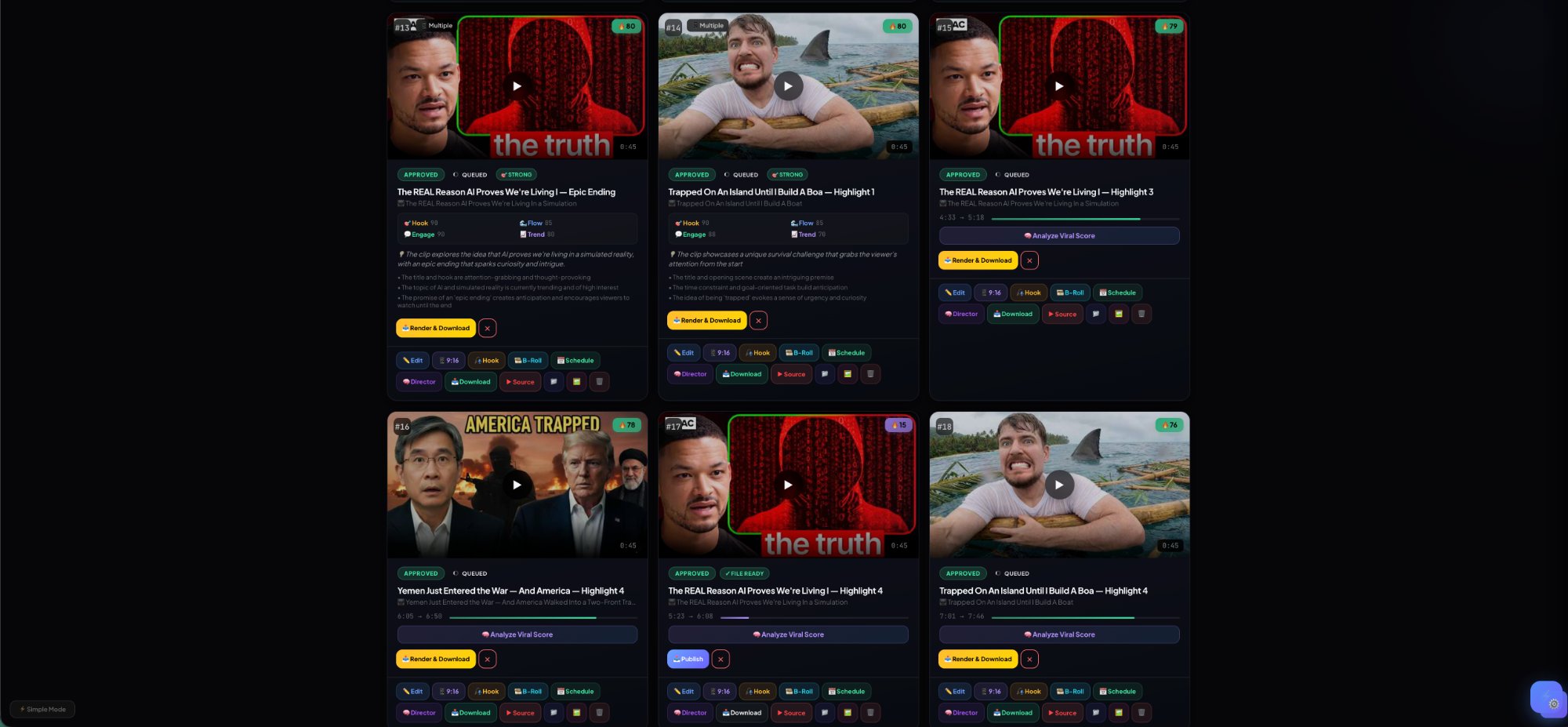
AI-Selected Clips
0 clips found — ranked by viral potential
All
🔥 Viral
📚 Educational
💗 Emotional
🎵 Music
🎯 Strong Hook
🚀 Launch Full Campaign
One click — captions, approve top clips, schedule, and track. Fully automated.
✂️ Clips
🎙️ Caption
✅ Approve Top
📅 Schedule
📊 Track
Loading your clips...
Connected Channels
Manage presets, branding, and auto-publish per channel
📊 Revenue Intelligence
47
Clips This Month
2.4M
Projected Views
94%
Avg. Viral Score
9:16 · 30s
Top Format
🚀 Batch God Commands
Processing... 0%
Clips Ready for Batch
Generate clips first in the Clip Engine tab, then batch-process them here
📁 Projects
Group your videos, clips, and schedules into organized projects
📁
📁
No projects yet
Projects organize your clips by campaign, client, or topic
Create a project to organize your videos, clips, and schedules
📅 Content Calendar
Schedule, visualize heat, and manage campaigns
📊 Analytics
Content performance overview
Activity Timeline
Platform Distribution
Top Clips by Viral Score
🔁 Performance Feedback Loop
Track views, retention, and engagement. Data feeds back into AI Director scoring — system gets smarter over time.
Click "Fetch from YouTube" or "Manual Entry" to start tracking
💬 Engagement Engine v1
Auto-reply to comments on YOUR published videos. Keyword-triggered, fully logged, rate-limited.
⚡ Worker
🧪 Dry Run
0
Total Replies
📋 Action Log
Click refresh to load action log
⚙️ Job Queue
Track all processing jobs — Auto Mode, reframe, captions, publishing
⚙️
⚙️
No active jobs
Jobs appear when you generate clips, render, export, or publish
Jobs appear when you use Auto Mode, reframe clips, or schedule publishing
👥 Team
Manage team members, roles, and approvals
Team Members
✅ Approval Queue
0 pending
No clips pending approval
⚙️ Approval Rules
No rules configured — all clips publish freely
📋 Activity Log
No team activity yet
📚 Content Library
Organize, categorize, and recycle your best content
Total
Ready
Evergreen
Recycle Ready
All
📚
Loading content library...
📤 Publish Queue
Manage drafts, scheduled posts, and publishing pipeline
0
Drafts
0
Queued
0
Publishing
0
Published
0
Failed
📤
No items in queue — publish or schedule clips to see them here
📬 Social Inbox
📬 Total: 0 🔴 Open: 0 📨 Unread: 0 ⚡ Priority: 0 😡 Negative: 0
On Track
Warning
⚠️ Breached
Avg Response
All
Open
Unread
⚡ Priority
😡 Negative
✅ Replied
📥 Click Sync to load comments
📬
Inbox ready
Connect your social accounts to pull in comments, DMs, and mentions
📬
Select a thread to view messages
Sync your YouTube comments first, then click any thread
⏰ Best Time Engine
AI learns your audience and recommends optimal posting times
Day Streak
Posts/Week
Gap Days
Consistency
📊 Performance Heatmap
Brighter = better performance at that time. Based on your actual post data.
Click "🧠 Learn from My Posts" to build your heatmap
🎯 Best Times to Post
Publish and track clips to get personalized recommendations
📋 Smart Queue Suggestions
Select clips and generate AI-optimized schedule
🤖 AI Command Center
AI tools + automation rules — your creator intelligence engine
🧠 AI Tools
🌐
Multi-Platform
One clip → 7 platforms
💬
AI Captions
5 caption styles
✏️
Title Generator
8 viral titles
#️⃣
Hashtag Packs
Reach + niche sets
♻️
Content Recycler
Refresh old winners
📊
Weekly Report
AI growth analysis
⚡ Automation Rules
Click "Install Presets" to get 6 starter automations
📜 Run History
No automation runs yet
👥 Creator Command
🔍 Social Listening
📡 Mentions
Add listening queries then scan your inbox
🔄 Repurpose Engine
One clip → every platform. AI-optimized titles, captions, hashtags.
Select a Clip to Repurpose
🔗 Link-in-Bio
Your smart creator landing page — auto-updates with latest content
PAGE SETTINGS
LINKS
📊 Analytics V2
Cross-platform unified dashboard + ROI tracking
BY PLATFORM
TOP CLIPS
♻️ Evergreen Recycler
Auto-repost top performers on a smart schedule
🧠 AI Content Planner
Weekly strategy + gap analysis + trend detection
🕳️ CONTENT GAPS
📈 TRENDING
🗑️ Trash
Deleted items — restore within 30 days or permanently delete
📋 Audit Log
Every action tracked — publish, reply, approve, delete, admin override
🎣 Hook Lab
Proven viral hooks — browse, apply, track performance
📡 Post-Publish Tracking
Live performance metrics for all published clips
🧪 A/B Testing
Test two versions, let data pick the winner
🌳 Content Lineage
Visualize how your content flows: Source → Clip → Variant → Post → Performance
SELECT A CLIP TO VIEW LINEAGE
🎭 Faceless Studio
Script → AI scene breakdown → faceless video. No camera needed.
🏪 Template Marketplace
Browse, install, and share community templates
📥 Source Ingest
Import from any source → repurpose to every platform
🔗 Paste URL
📝 Paste Text
IMPORTED SOURCES
👑 King Control Presets
Fine-tune AI output: controversy, formality, CTA, hashtags, emoji, reading level
🧵 Thread Builder
Turn any clip or text into a viral Twitter/X thread
🎠 Carousel Builder
Create Instagram carousels from any content
💬 Quote Cards
Extract powerful quotes and generate shareable cards
📏 Format Rules Engine
Platform-specific content rules — warn, auto-fix, or block violations
🔍 Competitor Analysis
Track competitors, find content gaps, steal strategies
🚀 Auto-Boost Rules
Automatically boost winning content based on performance
💡 Why It Worked
AI analysis of your best-performing content
💚 Creator Health Score
Composite score across posting, engagement, growth, and strategy
📜 Version History
Every edit saved — restore any previous version
📊 Usage & Limits
Monitor your usage across AI, renders, storage, and more
🧪 Sandbox Mode
Test everything safely — publishes are simulated, no real actions
👤 Client Review Portal
Generate secure review links — clients approve/reject without login
🏢 Agency Mode
Manage multiple client brands from one dashboard
🔔 Webhooks
Get notified via HTTP when events fire — publish, approve, milestone
🔑 API Keys
Programmatic access to Nova Creator OS
🛡️ Compliance Scanner
AI-powered brand safety, copyright risk, and policy checks
ℹ️ System Info
🔔 Notification Center
Smart alerts, milestones, performance insights
💰 Revenue Dashboard
📊 PLAN BREAKDOWN
⚠️ CHURN RISK
📈 RECENT EVENTS
🔗 Promote Links
Attach links to clips safely · Track clicks · Generate CTAs
👑 Monster Admin
God mode — system control, users, flags, health
🕐 Recent Clips
📤 Recent Publishes
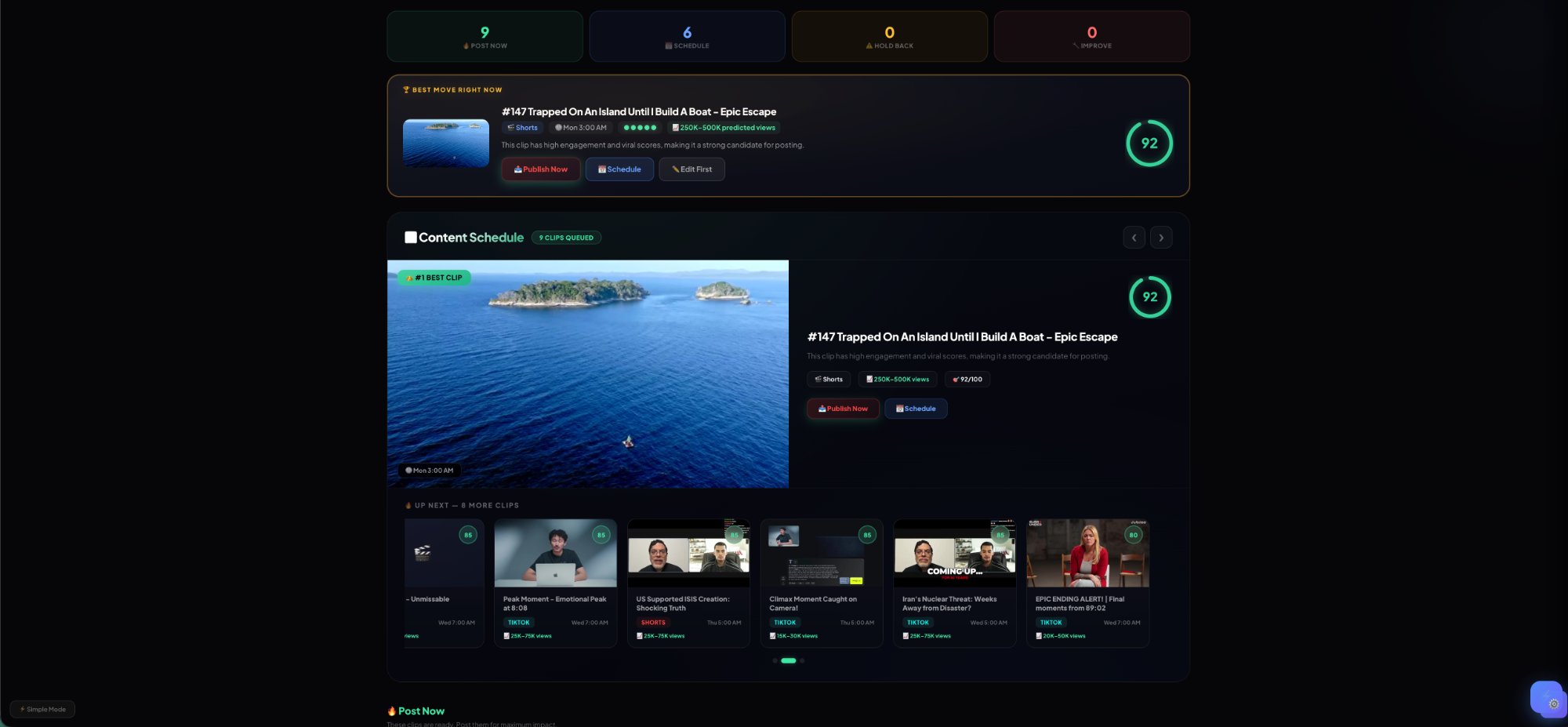
🧠 AI Director
Nova decides what to post, where, when, and why.
0
🔥 Post Now
0
📅 Schedule
0
⚠️ Hold Back
0
🔧 Improve
🧠
AI Director Ready
Click "Analyze All Clips" to get AI-powered recommendations on what to post, where, and when.
👑 King Controls
9:16 1080p TikTok Bold White
Aspect Ratio
9:16
16:9
1:1
4:5
Resolution
720p
HD
1080p
Full HD
4K
Ultra HD
Platform Presets One-tap format
TikTok
9:16 · 1080p · 60s max
YouTube Shorts
9:16 · 1080p · 58s max
📷
Instagram Reels
9:16 · 1080p · 90s max
YouTube Long
16:9 · 1080p · No limit
📷
Instagram Feed
1:1 · 1080p · 60s max
📷
Instagram Portrait
4:5 · 1080p · 60s max
Caption Style 6 FREE · 16 PRO
Brand Pack PRO+
🎨
Upload logo, set colors & fonts
Apply your brand to all clips with one click
Live Preview Matrix PRO+
TikTok
TikTok 9:16
Shorts
Shorts 9:16
Feed
IG Feed 1:1
YouTube
YouTube 16:9
🎬 Hero Media Control
Clip #1 — Editing
0:12 → 0:42 · 30s
LIVE
JRev
KPause
LFwd
CCut
ZUndo
SpacePlay
←→Frame
⌘EExport
SSafe Zone
TCaptions
📝 TRANSCRIPT
👑 Transcript
Load captions first — tap 🎙️ Transcribe
Tap 🎙️ for captions
Likes area
Bottom UI
0:00 / 0:30
SNAP
TC:
In: 0:00
Out: 0:30
100%
🎬
🖼
loading frames...
💬 CAP
😀
🧠 AI
🎵
🎵 Drop audio or click to add music
🔊
🔊 Drop SFX or click to add
🚩
NOVA EDITOR
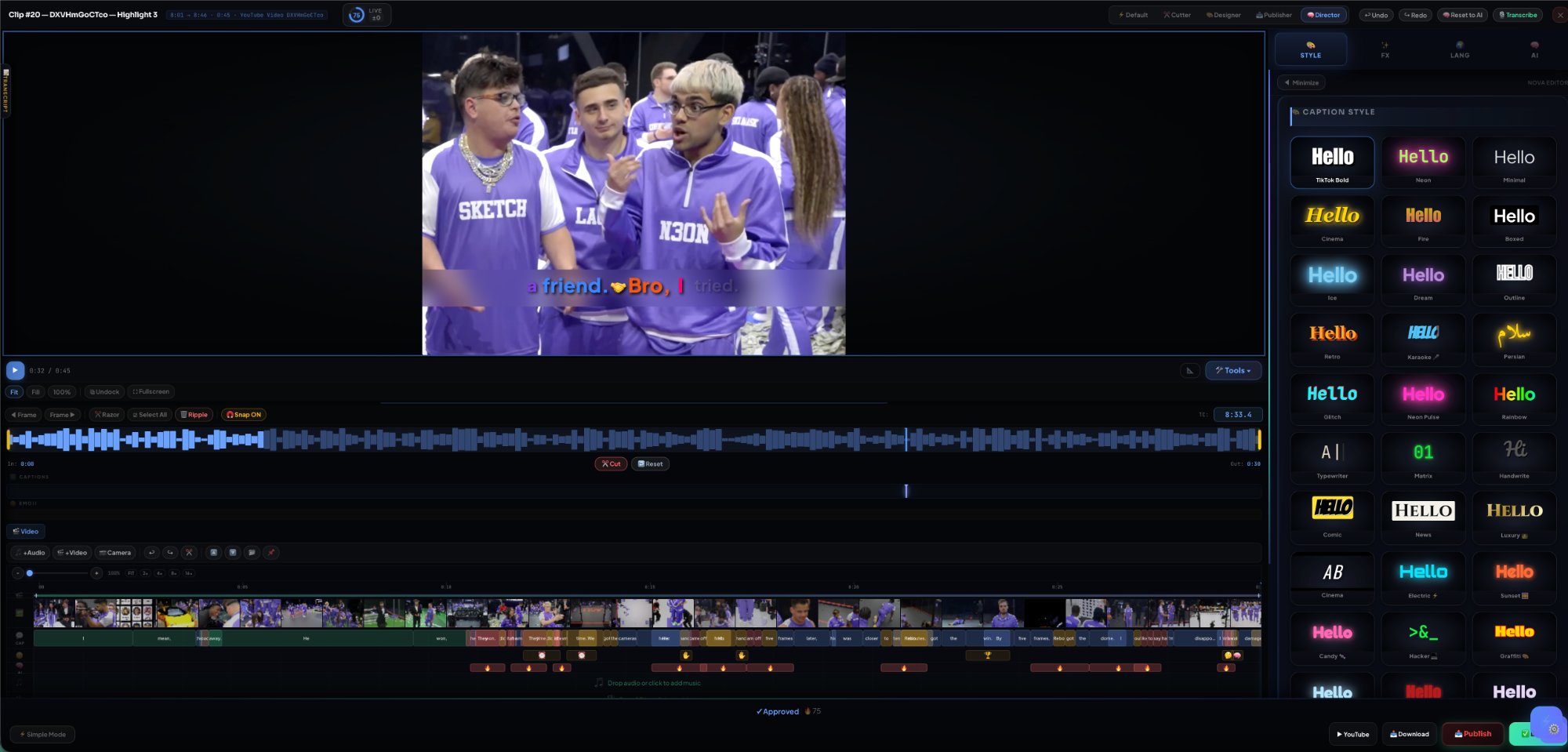
🎨 Caption Style
Hello
TikTok Bold
Hello
Neon
Hello
Minimal
Hello
Cinema
Hello
Fire
Hello
Boxed
Hello
Ice
Hello
Dream
Hello
Outline
Hello
Retro
Hello
Karaoke 🎤
سلام
Persian
Hello
Glitch
Hello
Neon Pulse
Hello
Rainbow
A|
Typewriter
01
Matrix
Hi
Handwrite
Hello
Comic
Hello
News
Hello
Luxury 👑
AB
Cinema
Hello
Electric ⚡
Hello
Sunset 🌅
Hello
Candy 🍬
>&_
Hacker 💻
Hello
Graffiti 🎨
Hello
Frost ❄️
Hello
Blood 🩸
Hello
Pastel 🌸
Hello
Vapor 🌊
Hello
Spotlight 💡
👑 My Presets
No saved presets yet.
Style your captions, then tap Save.
🌍 Language & Translation
Caption Language
Show Translation
🌐 Translation Only Mode
Video already has captions? Add translation overlay without transcribing.
RTL Text Direction
Dual Caption
Burn-in Preview
Sync Style → Translation
🔗 Link Position (both move together)
Caption Overlay
🔤 Font
Jakarta
Impact
BEBAS
ANTON
Bangers
Oswald
Montserrat
Poppins
Impact
BEBAS
ANTON
Bangers
Oswald
Archivo
Lilita
Montserrat
Poppins
Rubik
Lucky
Ops One
Marker
Righteous
Russo
Passion
Lobster
Pacifico
Fredoka
Cinzel
Orbitron
Pixel
8-bit
Comic
Jakarta
Sora
Georgia
Code
Montserrat
Poppins
Rubik
Arial
وزیر
امیری
نسخ
نوتو
لاله‌زار
شهرزاد
رقعه
روبیک
📍 Caption Position
Top
Center
Top Right
Mid Left
Bottom
Mid Right
Lower Left
Safe Bottom
Lower Right
Y Offset 0px
X Offset 0px
Max Width 90%
🎛️ Fine-Tune
Letter Space 0
Line Height 1.35
Opacity 100%
Shadow 4
Glow 0
Outline 0
Rotation
Anim Speed 1x
BG Blur 0px
🎨 Quick Colors
Recent Colors
Custom color
⚡ Smart Presets
🔥
Viral
Bold + Fast + Hook
🎙️
Podcast
Clean + Minimal
📖
Story
Cinema + Slow
🎵
Music
Karaoke + RTL
😂
Comedy
Pop + Emoji
📰
News
Serif + Boxed
🎥 Video Filters
Brightness 100%
Contrast 100%
Saturation 100%
Blur 0px
Grayscale 0%
None
🌅 Warm
❄️ Cool
📷 Vintage
🎭 Dramatic
⚫ B&W
⏩ Playback Speed
👑 King Controls
Font Size 22
Glow 0
Shadow 2
Outline 0
Letter Gap 0
Line Height 1.2
Opacity 100%
Blur 0
Words/Line 5
🌈 Color Engine
Text Color
Outline Color
Gradient Text
Caption Background
✨ Animation Engine
Word Animation
None
Bounce
Wave
Pulse
Typewriter
Glow Pulse
Slide Up
Pop In
Shake
Explode
Color Flow
Stagger
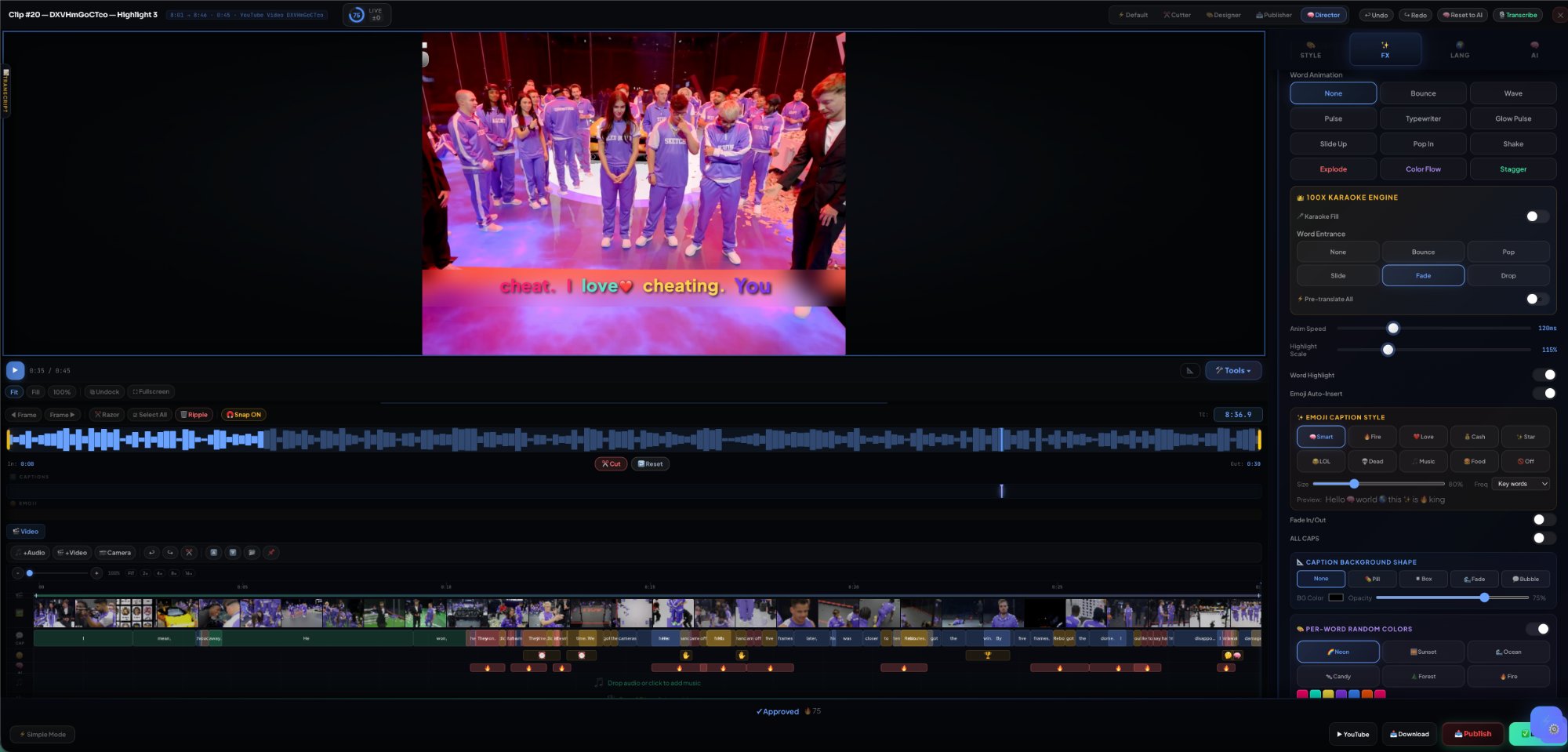
👑 100x Karaoke Engine
🎤 Karaoke Fill
Word Entrance
None
Bounce
Pop
Slide
Fade
Drop
⚡ Pre-translate All
Anim Speed 120ms
Highlight Scale 115%
Word Highlight
Emoji Auto-Insert
✨ Emoji Caption Style
🧠 Smart
🔥 Fire
❤️ Love
💰 Cash
✨ Star
😂 LOL
💀 Dead
🎵 Music
🍔 Food
🚫 Off
80%
Preview: Hello 🧠 world 🌎 this ✨ is 🔥 king
Fade In/Out
📐 Caption Background Shape
None
💊 Pill
◼ Box
🌊 Fade
💬 Bubble
75%
🎨 Per-Word Random Colors
Playback 1x
🎭 Variation Mode PRO
📌
Original
AI suggestion
🔥
Viral
Fast cuts, bold
💼
Pro
Clean, minimal
💗
Emotional
Warm tones
🎬
Cinematic
Film look
Hype
Max energy
🧠 AI Content Panel
🎯 Hook —
🔥 Viral —
📈 Engage —
Target Platform
TikTok
Shorts
Reels
YouTube
X/Twitter
Tone
🔥 Viral
✨ Clean
💥 Bold
📖 Story
💼 Pro
🪝 Hooks (0/5)
🪝
Click "Generate All Content" to create 5 hooks
💬 Captions (0/3)
💬
Click "Generate All Content" to create 3 captions
# Hashtags
#viral #fyp #shorts
📣 Call to Action
📣
Generate content to see CTA suggestions
🌐 Platform Versions
AI-optimized versions for each platform — different crop, hook, captions, duration.
📱
TikTok
9:16 · 60s max · bold captions
🎞️
Reels
9:16 · 90s max · clean aesthetic
▶️
Shorts
9:16 · 58s max · retention focus
💼
LinkedIn
1:1 or 16:9 · subtitle heavy
🎣 Viral Hook Library
All
❓ Question
📊 Stat
🔥 Controversy
📖 Story
💪 Challenge
🎬 BTS
⏳ Cliffhanger
👥 Social Proof
🎣
Loading hooks...
📊 Post-Publish Tracking
Views
Likes
Comments
Engage %
📈 Views Over Time
Track this clip to see growth chart
👑 Top Performing Clips
Publish and track clips to see leaderboard
🎙️ Voice Studio
⚡ Quick
🎨 Style
🔧 Advanced
Language
Language
Gender
Tone
Speed
Slow Fast 1.0×
VOICE PREVIEW
🧬 Voice Clone
🎤
Upload voice sample (30s minimum)
MP3, WAV, M4A — your voice becomes the AI
✅ Voice cloned — ready to use
Language + Accent
Pitch
LowHigh0
Speed
0.5×2.0×1.0×
Stability
VariableStable50%
🎛️ Effects
🌍 Auto Dub (translate + voice)
🎬 Original
🔤 Translate
🎙️ Voice
🔊 Replace
⚡ PLATFORM PRESETS
📝 TEXT & CAPTION REMOVAL
No regions — scan or pick a preset
⚡ DEFAULT
9:16
100%
0:00 / 0:30
⌨️ ? for shortcuts

👑 Unlock Full Power

More power = more growth = more money. Choose your level.

Free
$0/mo
Get hooked
  • 3 clips / video
  • 5 videos / month
  • 30 credits / month
  • 720p export
  • 6 caption styles
  • Watermarked
  • YouTube publish
  • Auto Mode
  • Scheduler
Creator
$19/mo
Start growing
  • 20 clips / video
  • 30 videos / month
  • 200 credits / month
  • 1080p export
  • All captions
  • No watermark
  • YouTube publish
  • Basic scheduler
  • Limited Auto Mode
Studio
$99/mo
Teams & agencies
  • Unlimited everything
  • 5,000 credits
  • 4K export
  • All captions
  • No watermark
  • Priority render
  • Team seats (5)
  • Advanced analytics
  • Brand system
  • Batch workflows
Enterprise
Custom
Full power. Your rules.
  • Everything in Studio
  • Unlimited credits
  • API access
  • White-label
  • Custom AI models
  • Dedicated servers
  • SSO / RBAC
  • Unlimited team
  • SLA support

🏢 Enterprise Inquiry

Custom pricing for teams, agencies, and high-volume creators

Welcome to Nova
Log in to save your work and unlock full power
or
Don't have an account?

💎 Credit Boost Packs

Need more power? Credits never expire and stack on top of your plan.

💎
100
credits
$5
BEST VALUE
💎💎
500
credits
$19
💎💎💎
1,000
credits
$29
100%
👑 KING CREDITS
0 / 0
+0 bonus Resets in --
FREE
0
Used
0
Available
0
Bonus
0
Actions
⚡ Cost Per Action
📊 Activity Feed
📊
Start clipping to see your activity feed

🎁 Refer & Earn Credits

Progress to Free Pro Account
0 / 10
Refer 10 friends → Get Pro plan FREE forever
Your Referral Link
0
Sign-ups
0
Upgrades
0
Credits Earned
How it works
🔗 Share your unique link with friends
✅ They sign up → +50 credits for you, +20 credits for them
⚡ They upgrade → +200 bonus credits
👑 10 referrals = Free Pro account forever!
⏳ Referral credits expire after 45 days — use them!
🔒

Upgrade to Unlock

This feature requires a higher plan.

🔥
Nova Auto Mode
Paste a URL and let Nova build your content strategy
Video Source
Target Platform
🌐 All
📱 TikTok
🎬 Shorts
📸 Reels
Content Mode
🔥 Viral
🎙 Podcast
🎵 Music
🎤 Interview
⚙ Advanced Settings
Max Clips
Top 3
Top 5
Top 10
All
🔥
Ready to build your content engine
Paste a YouTube URL, pick your platform and content mode, then hit Launch. Nova handles everything.
🧠
Nova Brain
Status
Waiting for input
Video Type
Clips Found
0
Strongest Hook
Best Platform
Top Score
Nova Says
Paste a URL to begin analysis

🚀 Autopilot Pipeline

One click. Full pipeline. Generate → Caption → Reframe → Export → Publish.

1
⚡ Generate Clips
AI finds viral moments, scores and ranks them
2
💬 Auto-Caption
Transcribe with Whisper + apply your style preset
3
📐 Smart Reframe
Face-track → crop to 9:16 vertical for Shorts/Reels/TikTok
4
🔥 Burn-In Export
FFmpeg burns captions into video → production-ready MP4
5
📤 Publish to YouTube
Upload as YouTube Short with title, tags, thumbnail
TargetAll clips
Caption StyleCurrent style
Reframe9:16 (Shorts)
Estimated Time~2-5 min per clip
Action completed

👑 Add Channel

Connect any platform — start clipping in seconds

🔗 Paste Channel URL or Handle
Display Name (optional — auto-detected from URL)
📡 Platform
YouTube
🎵 TikTok
📸 Instagram
𝕏 Twitter/X
📘 Facebook
Aspect Ratio
9:16
16:9
1:1
4:5
Max Clip Length
👑 King Auto-Settings
🚀 Run My Studio
Choose what your system does — then sit back.
✂️
Create ClipsGenerate AI clips from your latest video
🎙️
Caption AllAuto-transcribe and style captions
Approve Top ClipsAuto-approve clips scoring 65+
📅
Schedule PostsSchedule across the next 7 days at best times
🔄
Repurpose WinnersCreate 6 platform variants of top clips
📤
Publish NowImmediately publish approved clips
🎙️
Add VoiceoverAuto-voice with best match or your clone
💰
Attach MonetizationAuto-attach your default link to approved clips
⚡ Instant Mode — Review Before Launch
Your AI selected the best. Review, adjust, then launch.
🔥 AUTO-SELECTED CLIPS
📅 PROPOSED SCHEDULE
🚀
Campaign Launched!
Your content machine is running
📈 Estimated Reach
Based on your avg scores and platform data
Upload Video
Paste URL
Auto Mode
Monetize This
Command Bar
Upgrade Plan